How to Show Strava on an E-Ink Desk Display With Activity Frame
Published
July 1, 2026
Topic
show strava on e-ink
You log rides and runs in Strava. You still open the app on your phone to see this week's distance, your yearly goal bar, or whether yesterday synced. Those numbers stay buried behind an icon and a feed full of other people's adventures until you go looking.
Activity Frame puts a chosen subset of Strava on a TRMNL e-ink panel at your desk. Distance, goals, route shapes, and friend activity stay readable without another phone session. This is the canonical setup guide: problem, account, Strava connection, TRMNL plugin, screen selection, and what to expect after sync.
The problem this setup solves
Strava dashboards on a phone excel at depth. Segments, photos, clubs, and comments belong there. Daily awareness belongs somewhere you glance without intent: beside your monitor, on a kitchen shelf, near the spot where you decide to ride or run.
E-ink fits that job. It reflects ambient light, uses little power, and holds a stable image between refreshes. Color LCD widgets glow and distract. Activity Frame layouts assume monochrome contrast and simplified graphics so route shapes and goal bars read at a distance.
TRMNL is the e-ink hardware platform. Activity Frame is the Strava plugin. Together they form a Strava dashboard on e-ink, refreshed on a schedule when new activities sync, not live mid-workout.
If you want the product rationale first, read e-ink displays for cyclists and runners or Strava dashboards: app views vs an always-on desk screen.
What you need before starting
A Strava account with activities syncing from your watch, phone, or bike computer as you already use today.
A TRMNL device set up on your network per TRMNL's hardware instructions. Activity Frame runs as a TRMNL plugin, not as a generic screensaver on random e-ink hardware.
A few minutes for account creation and OAuth. No API keys, no code repository, no print shop.
Activity Frame shows cycling and running activities from Strava. It does not replace recording workouts. It does not provide coaching plans, power analysis, or Strava heatmaps.
Step 1: Create an Activity Frame account
Go to Create an account on the Activity Frame site. Use an email you check for onboarding messages. Confirm the account if verification is required.
After sign-in, you land in app areas for dashboard, device linking, screen selection, and account settings. Onboarding may walk you through the same steps in order. Follow either path; the sequence below matches the marketing-accurate flow.
Keep Strava credentials handy. You will authorize Activity Frame to read activities and goals, not post on your behalf unless Strava's permission screen lists additional scopes. Accept only what you intend.
Step 2: Connect Strava
From Activity Frame, start the Strava connection flow. Strava opens a familiar OAuth page. Log in if needed, then approve access for Activity Frame.
On success, your recent activities and eligible goal data become available to the plugin. If a ride or run is missing on the panel later, fix sync at the source first: confirm the activity appears in Strava's own app.
Connection is persistent until you revoke it in Strava settings or Activity Frame account settings. Token handling stays on the service side. You do not manage refresh scripts like a DIY Strava API dashboard project.
Test with one recent activity visible in Strava before moving to TRMNL. Saves troubleshooting time if an old account permission blocked reads.
Step 3: Install Activity Frame on TRMNL
Open TRMNL's plugin or device management flow (wording depends on current TRMNL firmware and web UI). Add the Activity Frame plugin and link it to the account you created.
Pairing connects your physical panel to the Strava data you authorized. Multiple panels may be supported per TRMNL account policies; check TRMNL docs if you run more than one device.
Place the TRMNL on your desk or shelf before finalizing placement in software. Wi-Fi strength at the panel matters more than Wi-Fi at your router. Weak signal causes delayed refreshes that look like product bugs but are connectivity issues.
After install, the panel may show a default or loading state until the first successful sync. Give it one refresh cycle after Strava connection.
Step 4: Pick your screens
Activity Frame offers four screens. Choose the ones that match how you train. You can change selection later in Activity Frame settings.
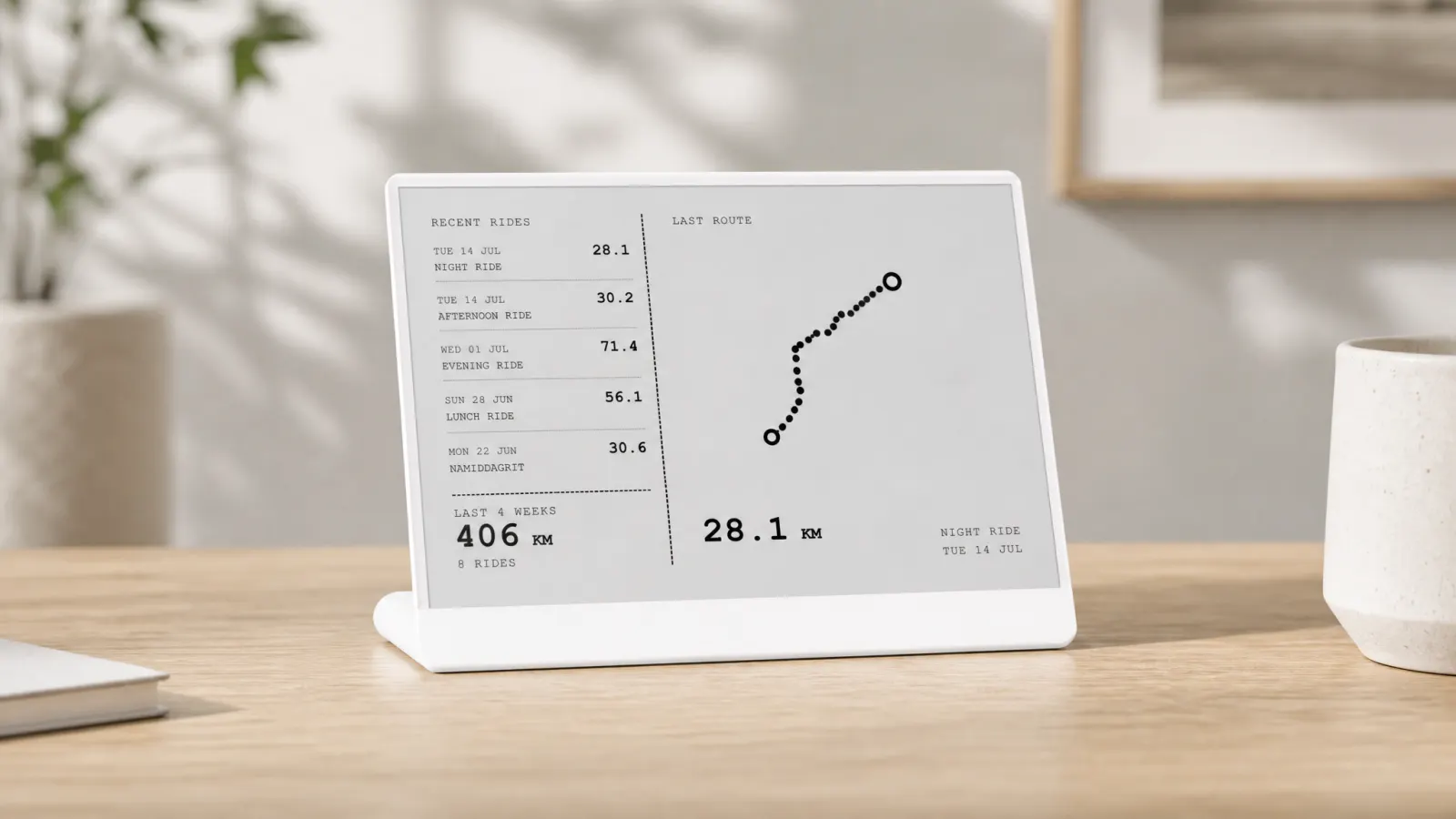
Latest rides
Shows recent Strava activities with key stats and simplified route shapes. Use this when you want a rolling reminder of what you actually rode or ran. Route traces are monochrome-friendly outlines, not full color map tiles.
Yearly goals
Shows progress toward annual distance targets configured in Strava. Use this when yearly kilometers drive your plan and you forget the bar exists until late in the quarter.
Week grid
Shows day-by-day activity in a compact grid. Use this when consistency matters more than one hero weekend ride. Empty midweek cells nudge before the week is gone.
Friends
Shows a light view of friend activity. Use this if social proof helps. Skip it if feeds distract you or you prefer private training.
Most athletes start with two screens, for example yearly goals plus week grid, then add latest rides when they want route shapes visible.
Cyclists unsure which metrics to prioritize should read cycling stats worth watching. Runners should see running stats that belong in the room.
What happens after setup
The TRMNL panel refreshes on a device schedule when new data is available. It is not live GPS during a workout. Finish a run, sync to Strava, wait for the next refresh window, and totals update on the panel.
Layouts respect e-ink limits: high contrast text, simplified routes, no dense phone UI chrome. Phone Strava remains the place for segments, comments, and exploration.
If you also decorate with posters, wall art and desk stats complement each other. See cycling frames: wall art and a stats frame on the desk.
Troubleshooting basics
Blank panel: Confirm TRMNL online, plugin linked, Strava connected, and at least one activity in Strava.
Stale totals: Check Strava sync from your recording device first. Then allow one TRMNL refresh cycle.
Wrong sport mix: Activity Frame lists recent activities from Strava regardless of sport type on latest rides. Filters are not a separate invented feature; what Strava returns is what displays.
Revoke access: Use Strava settings or Activity Frame account to disconnect if you pause the setup.
Who this setup is for
Cyclists and runners who already live in Strava and want desk-level awareness without building custom code. Remote workers, home office athletes, and anyone who misses yearly goals because the app stays closed.
Not for athletes who need live heart rate on a desk, rich color heatmaps, or training prescription software. Use the right tool for those jobs.
Soft CTA
You already record the work in Strava. Show the summary on e-ink in four steps: account, Strava, TRMNL plugin, screens.
Create an Activity Frame account, connect Strava, install on TRMNL, and pick latest rides, yearly goals, week grid, or friends for your desk.