E-Ink Displays for Cyclists and Runners (Why TRMNL + Activity Frame)
Published
July 9, 2026
Topic
eink display
You already log rides and runs in Strava. You still open the app five times a day to see the same three numbers: this week's distance, progress toward a yearly goal, whether yesterday counted. Each check pulls you into notifications, feeds, and other people's activities. The numbers were always in Strava. Keeping them in view took more effort than the check itself.
An e-ink display on your desk solves a narrow problem. It gives training stats a permanent surface without turning your workspace into a second glowing screen.
The gap phone apps leave
Strava on a phone is built for depth: segments, comments, photos, club feeds. That richness helps when you are planning a route or reviewing a workout. It hurts when you only want to know if you are on pace for March.
Unlock, tap, scroll, lock. Repeat tomorrow. The habit trains you to treat your own stats like incoming mail. Important, but easy to defer until you forget why you opened the app.
Runners hit the same loop with weekly mileage and race prep blocks. Cyclists watch annual kilometer targets slip during busy work weeks. Neither group needs more app time. They need ambient awareness: numbers that sit in peripheral vision while life happens.
Why e-ink fits endurance sports
E-ink panels reflect light like paper. They stay readable near a window, under office lights, and late in the evening without adding another bright rectangle to your desk. Power draw stays low because the image holds without constant refresh. That matches how training data behaves: it changes a few times a day, not every second.
Color LCD dashboards look sharp in demos and tiring over a full workday. E-ink trades color for calm. Route shapes, distance totals, and goal bars read clearly in monochrome when layouts respect contrast limits. Activity Frame is designed for that constraint from the start.
TRMNL is an e-ink hardware platform built for glanceable information at home and on a desk. Plugins connect data sources to physical screens. Activity Frame is the Strava plugin for cyclists and runners who want selected stats on TRMNL without building custom code.
If you are comparing desk setups, our guide on Strava dashboards vs an always-on desk screen walks through phone views next to a TRMNL panel.
What Activity Frame shows
After you connect Strava, you choose screens. Each screen maps to a layout on your TRMNL:
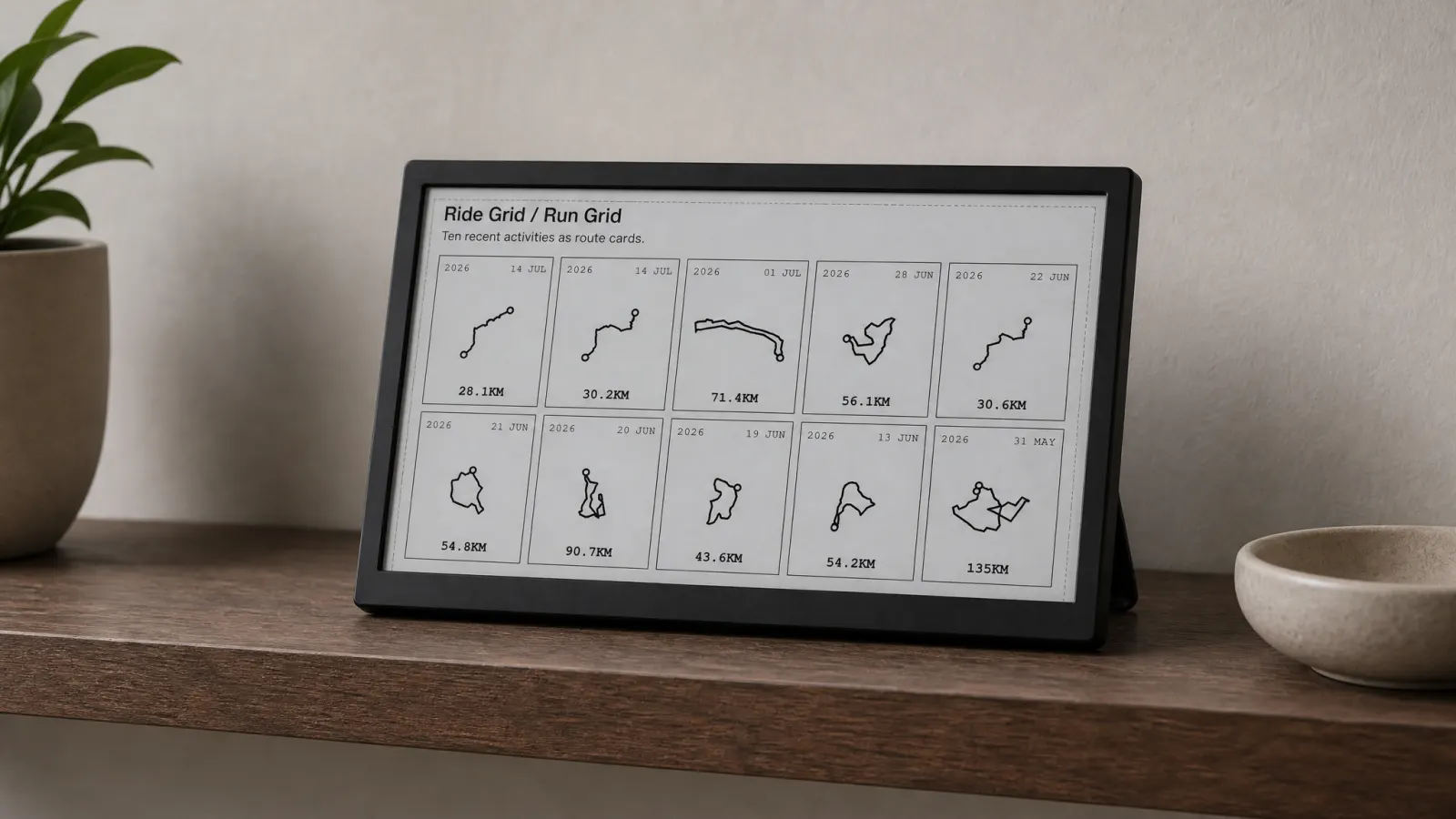
Latest rides lists recent activities with key stats and simplified route shapes. You see what you actually rode or ran without opening a map app.
Yearly goals tracks progress toward annual distance targets you set in Strava. The bar or total stays visible when monthly volume is easy to lose track of.
Week grid shows day-by-day activity in a compact calendar view. Consistency-minded athletes use it to spot empty days early in the week.
Friends offers a light social layer: who moved recently without pulling you into a full feed.
Nothing here replaces coaching software or deep analytics. Activity Frame does not prescribe workouts or analyze power files. It keeps a small set of Strava views on hardware meant for persistence, not interaction.
How setup works
The path is short and marketing-accurate:
- Create an Activity Frame account at
/auth/sign-up. - Connect Strava so activities and goals sync to the plugin.
- Install or link the Activity Frame plugin on your TRMNL device.
- Pick the screens you want on the panel.
Refresh timing follows your TRMNL schedule, not live GPS. You glance at updated totals after rides sync, not mid-stride telemetry. That is intentional. The product job is awareness between sessions, not race-day tracking.
For step-by-step detail with screen recommendations, see how to show Strava on an e-ink desk display with Activity Frame.
Cyclists vs runners on the same hardware
Both sports share Strava as a data home. Activity Frame treats cycling and running activities the same on latest rides and weekly views. Runners who care about monthly mileage get the same yearly goals and week grid benefits cyclists use for kilometer targets.
Route shapes on latest rides read differently by sport: loop roads vs out-and-back trails, track sessions vs long road rides. The simplified traces still give a spatial cue on e-ink without color elevation layers.
Runners comparing desk options should also read running stats that belong in the room for which numbers reward a physical display.
When an e-ink display is the wrong tool
Skip TRMNL if you need second-by-second heart rate, live segment racing, or rich color maps. Use your watch and phone for those jobs.
Skip it if you will never look at a desk during the day. A panel helps where you work, recover, or stretch. It cannot replace motivation you do not want visible.
Choose it when Strava already holds your goals and you want them in sight without another phone-check habit. Pair it with wall art or posters for milestone rides if you want both memory and momentum. Our cycling route map art print piece explains that split.
Putting it on your desk
Place TRMNL where your eyes naturally land: beside a monitor, on a shelf facing your chair, or on a side table you pass before evening runs. Angle matters less than proximity. If you never see the panel, it becomes decor instead of a tool.
Start with one or two screens, not all four at once. Yearly goals plus week grid covers many endurance athletes. Add latest rides when route shapes matter, friends when social nudges help.
Activity Frame is built for TRMNL and powered by Strava. The promise is simple: your activities, always in view, on hardware that respects a calm desk.
Create an Activity Frame account, connect Strava, and pick the screens that match your training.