Strava API Dashboards: Build One, or Skip Straight to Activity Frame
Published
July 4, 2026
Topic
strava api dashboard
Developers who train often hit the same weekend project idea: pull Strava data through the API, chart weekly miles, push it to a tablet on the desk. The stack varies. Python scripts, Grafana, a Raspberry Pi, an old iPad in kiosk mode. The motivation is control. You pick every metric and every pixel.
Control costs time. OAuth token refresh, rate limits, layout tweaks, and hardware babysitting accumulate faster than a Sunday hack session suggests. Many finished dashboards become stale when work weeks return.
What a Strava API dashboard project involves
Strava's API exposes activities, stats, clubs, and goals to authorized apps. You register a client, implement OAuth so users (usually just you) connect safely, store tokens, and fetch activities on a schedule. Then you render something somewhere: web page, e-ink driver, LED matrix, whatever you imagined on the whiteboard.
Common steps builders underestimate:
Token lifecycle. Refresh tokens expire. Silent failures mean blank screens until you debug on a Tuesday night.
Rate limits. Aggressive polling hits caps. You learn to batch requests and cache responses.
Layout maintenance. Every time you want yearly goals beside a week grid, you edit code and redeploy.
Hardware glue. Driving e-ink or a wall tablet adds drivers, cron jobs, and power quirks TRMNL owners skip by using a supported platform.
If you enjoy that maintenance, a custom Strava API dashboard is a rewarding hobby. If you want stats on a desk this month, the build path may overshoot the job.
The gap hobby projects leave
Homebuilt dashboards often live on glowing screens or laptops that sleep. E-ink-specific formatting takes extra work: contrast, font sizes, no color elevation layers. A beautiful D3 chart on a monitor does not translate to a TRMNL-class panel without effort.
Social features and friend views mean more API calls and privacy decisions. Route maps need simplification for monochrome displays. Each feature expands scope.
Meanwhile Strava already provides the analytics you need on the phone for deep sessions. The desk job is narrow: show a few summaries always in view. Reinventing that pipeline duplicates work Activity Frame already ships for TRMNL.
Activity Frame as the skip-the-build path
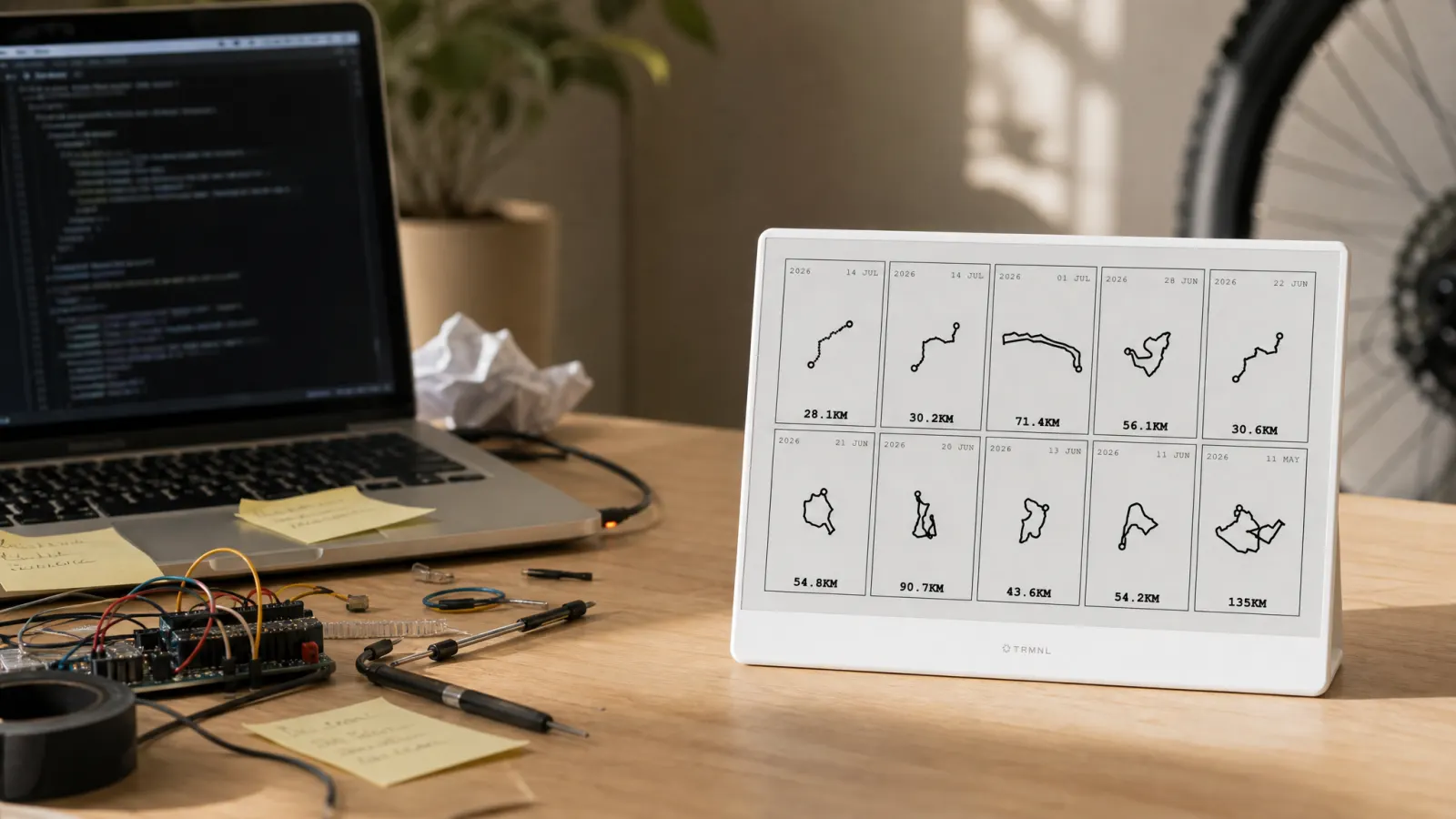
Activity Frame connects Strava to TRMNL without you hosting OAuth or drawing layouts from scratch. Pick screens:
- Latest rides with route shapes and key stats
- Yearly goals tied to Strava targets
- Week grid for day-by-day consistency
- Friends for a light social view
Setup: create an account, connect Strava, install the plugin, choose screens. Refresh follows TRMNL's schedule when activities sync. No repo to maintain, no token cron on a home server.
Tradeoff: you customize within Activity Frame's screen set, not with arbitrary widgets. For most endurance athletes, that set matches what they wanted from a first-version API dashboard anyway.
Compare always-on behavior to the phone app in Strava dashboards: app views vs an always-on desk screen.
When building still makes sense
Build if you need metrics Activity Frame does not surface and you enjoy devops as a hobby. Examples: club-wide leaderboards with custom scoring, warehouse-scale integrations, non-Strava data merged into one exotic wall board.
Build if you are learning the Strava API for a product unrelated to your desk. The dashboard is a side effect, not the goal.
Skip building if the desired outcome is "see my kilometers and goals without opening Strava on my phone." That outcome is the product promise of Activity Frame.
Cyclists choosing desk metrics without code should read cycling stats worth watching. Runners should see running stats that belong in the room.
Cost comparison (time, not dollars)
| Factor | DIY Strava API dashboard | Activity Frame |
|---|---|---|
| Initial setup | Hours to weeks | Minutes |
| Ongoing maintenance | Token, API, layout | Service handles sync |
| E-ink formatting | You implement | Included |
| Hardware | You source and drive | TRMNL device |
| Feature scope | Unlimited if you build | Four focused screens |
| Best for | Tinkerers, custom data | Athletes who want glances |
Neither option replaces Strava for recording activities. Both assume you already train with GPS or a watch synced to Strava.
Hybrid path
Some developers run Activity Frame on TRMNL for daily awareness and keep a private API project for experiments. The desk panel stays stable. The repo stays playground. That split avoids coupling your morning glance to last night's refactor.
If you start building and hit diminishing returns, pivoting to Activity Frame means matching the tool to the job instead of maintaining code you no longer need.
Full setup guide: how to show Strava on an e-ink desk display with Activity Frame.
Soft CTA
You can spend weekends maintaining tokens or you can connect Strava once and pick screens. If the second path matches your goal, skip the API scaffold.
Create an Activity Frame account, link Strava and TRMNL, and put your stats on e-ink without shipping dashboard code.